
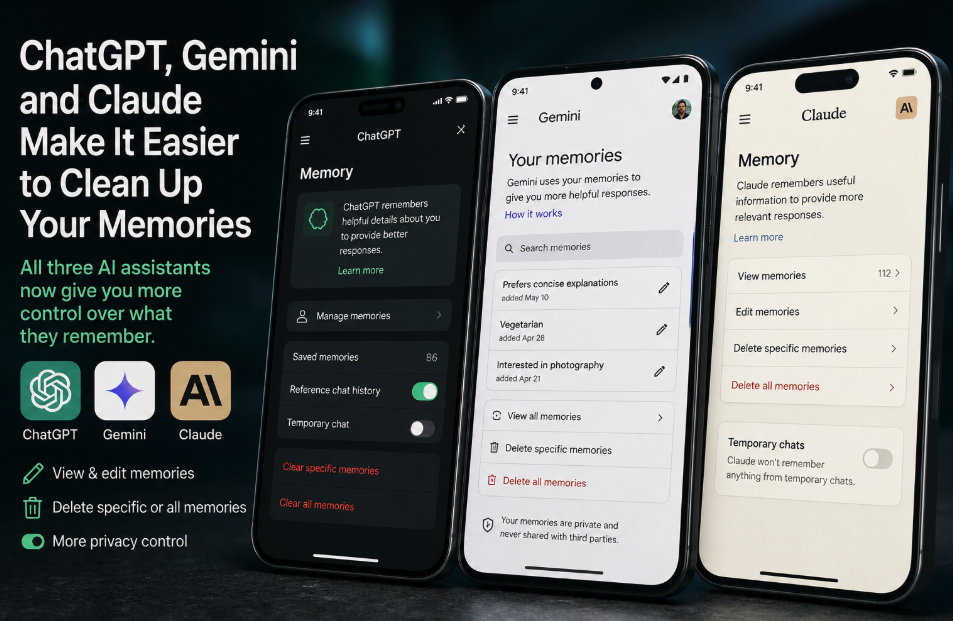
AI assistants are increasingly designed to remember users rather than start every conversation from zero. ChatGPT can carry useful context across chats, Gemini can personalize responses using previous conversations, and Claude can build persistent memory from chat history. That continuity is one of the biggest improvements in everyday AI usability — but it also creates a maintenance problem that becomes more visible the longer someone uses the same assistant.
An Android Authority analysis published August 29 argues that accumulated memories can gradually make AI assistants feel less reliable. Old preferences may survive after circumstances change, hypothetical scenarios can be mistaken for real information, and instructions from unrelated projects can leak into new work. The practical recommendation is simple: periodically inspect what the assistant believes it knows about you and remove information that is outdated, misleading or no longer useful.
The underlying problem is real, although it is better described as context drift than as proof that an AI model itself becomes worse over time. The model has not necessarily lost capability. Instead, the personalized context supplied to it may contain stale, contradictory or irrelevant information, causing otherwise capable models to answer from a distorted picture of the user.
Memory turns personalization into a data-quality problem
Persistent memory solves an obvious weakness of early chatbots: repetition. If an assistant already knows a user prefers concise explanations, works on a particular project or follows certain dietary constraints, it can apply that context without asking for it in every new conversation. Over months of use, however, some of those facts inevitably change.
A professional project ends. A writing style evolves. A temporary interest disappears. An experimental prompt describes a fictional scenario that was never meant to become part of the user’s actual profile. If the assistant continues to treat those details as relevant, personalization can work against the user rather than for them.
OpenAI’s current Memory FAQ explicitly acknowledges the possibility of conflicting memories. Its newer memory system continuously updates a summary of useful context and gives users tools to correct or suppress details. OpenAI also notes that the visible memory summary does not necessarily contain every piece of context ChatGPT may derive from previous chats, which makes conversational auditing — simply asking what ChatGPT remembers — useful alongside the settings interface.
ChatGPT now gives users more granular memory controls
ChatGPT’s memory system has evolved beyond a simple list of manually saved facts. OpenAI says memory can draw useful context from chats, files and connected apps when enabled, while the newer experience maintains an automatically updated memory summary. Users can edit that summary, highlight information for correction and use a “Don’t mention this again” control when they want ChatGPT to avoid bringing up a particular detail.
There is an important distinction between suppressing and deleting information. OpenAI says “Don’t mention this again” is intended to reduce unwanted references, but it does not itself erase the underlying information. Fully removing something ChatGPT may know can require deleting the relevant sources, including past or archived chats, files, memory information and connected-app data containing the same detail.
Users of the legacy saved-memory system can also remove individual memories, delete them all or ask ChatGPT directly to forget something. OpenAI stores saved memories separately from chat history, so deleting a conversation alone does not necessarily remove a saved memory created from that conversation. Conversely, deleting a saved memory does not erase places where the information already appears in old chat transcripts.
That separation is one reason periodic review matters. Users who assume clearing old chats automatically resets everything ChatGPT has learned can leave behind personalization context they intended to remove.
Gemini increasingly learns from conversation history
Google has also been expanding persistent personalization in Gemini. Its current Gemini documentation explains that the assistant can use memory of past Gemini chats to understand more about a user and personalize future responses. The feature depends on account and activity settings and is not available in every Gemini surface.
This makes Gemini vulnerable to the same basic maintenance issue: conversation history reflects who the user was at different points in time, not necessarily who they are now. If an older conversation established a preference or project constraint that is no longer valid, later personalization can inherit it unless the user corrects the record or removes the relevant activity.
Google gives users controls over Gemini Apps Activity and personalization, but its approach is not identical to ChatGPT’s. Android Authority notes that Gemini’s newer personalization experience can make individual remembered facts less straightforward to audit than a simple memory list, sometimes leaving users to identify and delete the conversations responsible for unwanted context. Google also provides an Instructions for Gemini feature for explicit preferences, making it worth reviewing those instructions separately when responses begin following outdated rules.
Claude has moved to an improved persistent-memory system
Anthropic has recently changed Claude’s memory architecture as well. Its updated memory documentation says Claude can search previous conversations and remember useful context from chats for future conversations and Cowork tasks. Anthropic has migrated users away from its legacy memory experience to a newer system and, through September 9, 2026, is offering an export option for legacy memory in case information was lost during that migration.
Claude allows users to review and edit stored context through its Memory settings and to modify what the assistant remembers conversationally. This is particularly useful when the problem is not that all personalization is unwanted, but that one category has become stale. A user might want Claude to retain established writing preferences while forgetting an old employer, completed project or temporary research topic.
The ability to edit rather than simply disable memory is important because the goal of maintenance should usually be better personalization, not less personalization. Starting from zero eliminates stale context, but it also eliminates genuinely useful knowledge the assistant has accumulated.
Why contradictory memories are more damaging than a large memory alone
It is tempting to frame the issue as simple “memory overload,” but quantity is not necessarily the most important variable. Relevance and consistency matter more. One hundred accurate, well-scoped details may be more useful than ten facts that contradict one another or belong to unrelated contexts.
Consider a user who once told an assistant to edit marketing copy in an aggressive sales style and later switched to a restrained editorial voice. If both preferences remain active without clear temporal context, the assistant may oscillate between them. Similarly, a fictional investment simulation can become problematic if later retrieval treats its invented holdings as part of the user’s real finances.
These failures resemble a database-quality problem: bad input context can produce bad personalization even when the underlying model is functioning normally. Cleaning memory is therefore less like “speeding up” an AI model and more like correcting the profile the model consults before answering.
Temporary and private modes can prevent clutter before it starts
One of the easiest ways to manage AI memory is not to create unnecessary persistent context in the first place. Casual experiments, fictional scenarios, one-off role-playing tasks and questions that should not influence future personalization are good candidates for temporary or non-persistent sessions where available.
This is becoming especially important as memory systems grow more capable. The more effectively an assistant extracts useful patterns from conversations, the more important it becomes for users to signal when a conversation should not become part of that long-term picture. Temporary modes are therefore not only privacy features; they can also function as memory-hygiene tools.
Users should still check the exact behavior of each product, because temporary-chat and activity controls differ between services and can change over time. The safest assumption is not that every incognito-style mode behaves identically, but that each provider’s current memory documentation defines what is retained, referenced and deleted.
A periodic memory audit is becoming normal AI maintenance
For frequent AI users, a simple review every few months may prevent many personalization problems. Ask the assistant what it knows about your preferences and ongoing work, inspect the product’s memory or activity settings, remove obsolete projects, correct changed facts and separate durable preferences from temporary instructions. If responses suddenly begin referring to irrelevant topics, an old memory is worth investigating before assuming the model itself has deteriorated.
The same principle applies to explicit instructions. Memory is only one layer of personalization; custom instructions, project-specific context, connected apps and historical conversations can all influence what an assistant believes is relevant. Cleaning one layer while leaving contradictory guidance elsewhere may not solve the problem.
Persistent memory is making ChatGPT, Gemini and Claude more useful because it allows them to develop continuity with their users. But continuity has a cost: the profile needs to remain accurate. As AI assistants remember more, users are effectively becoming curators of a small personal knowledge base — and occasionally cleaning that knowledge base may be the difference between personalization that feels intelligent and personalization that feels strangely stuck in the past.