
Google has introduced a new option allowing administrators to assign or unassign Google Calendars to Meet hardware devices in bulk using CSV uploads.
Google has added a small but useful update for administrators managing Google Meet hardware devices.
According to an update in the Google Workspace documentation, admins can now assign or unassign Google Calendars to Meet hardware devices in bulk using a CSV upload.
Previously this process typically required assigning calendars one device at a time, which could be time consuming for organizations managing a large number of meeting room devices.
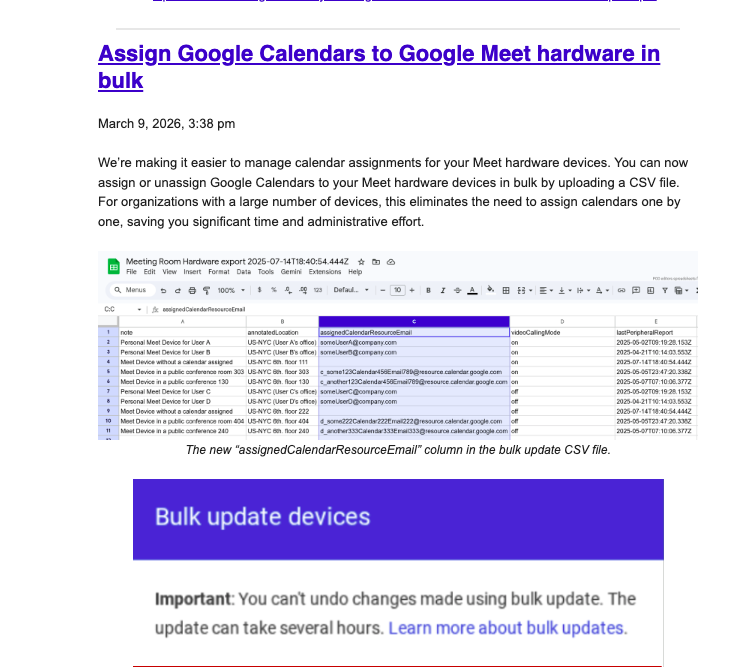
With the new option, administrators can upload a CSV file and update multiple devices at once. The update introduces a new column called assignedCalendarResourceEmail inside the bulk update file.
This allows admins to specify which calendar resource should be linked to each Meet device.
Google says this should make managing large deployments easier, especially for companies with many conference rooms or shared devices.
The bulk update process is done through the Meet hardware export and import workflow used by Workspace administrators.
Google also notes that changes made through bulk updates cannot be undone and the update process itself may take several hours depending on the number of devices being updated.
This appears to be mostly an administrative improvement, but for organizations managing dozens or hundreds of meeting rooms it could save significant setup time.