
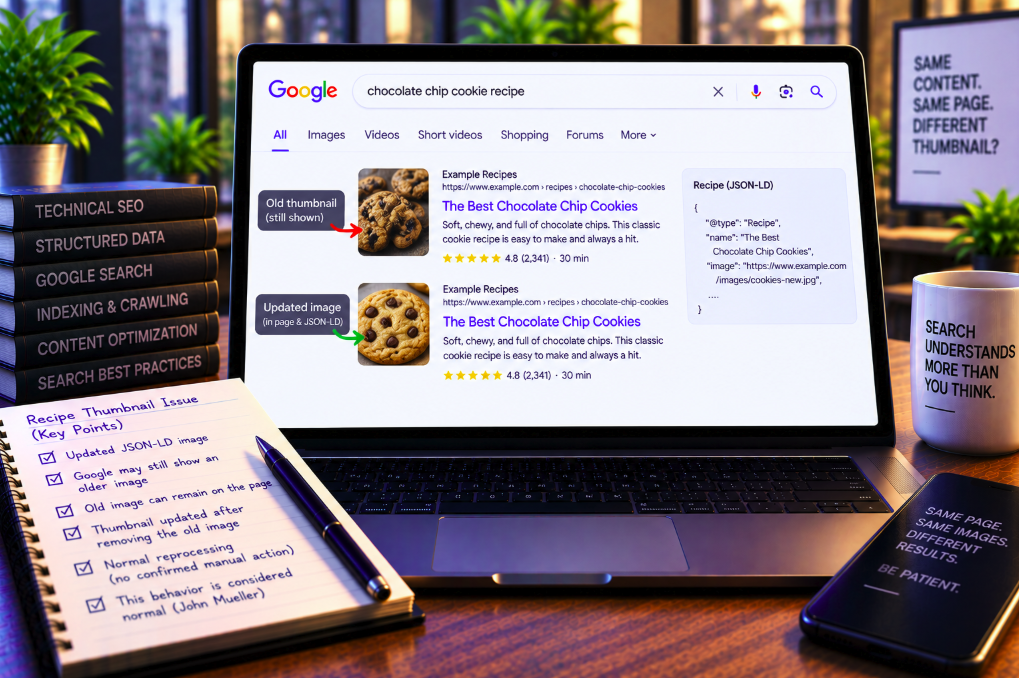
Changing the image in Recipe JSON-LD does not necessarily tell Google to replace the thumbnail it shows beside a normal search result. If the previous photo is still present and prominent on the page, Google may continue choosing it even when the structured data clearly points to a newer image.
That is the practical lesson from a recipe-site case discussed by Google’s John Mueller and reported by Search Engine Roundtable on September 14. Inspired Taste had replaced the primary photo on an easy baked apples recipe and updated the corresponding JSON-LD, yet Google continued displaying the older image in Search for roughly two weeks.
The reason was not necessarily stale schema processing. The old photo still existed on the page as a prominent secondary image. Mueller said that under those circumstances it was not unexpected for Google to continue selecting it as the thumbnail.
After the publisher removed the old image, the Search thumbnail eventually changed. But there is no evidence that Google manually intervened or deployed a special fix: Mueller said he imagined the change was simply the result of normal reprocessing in Google’s Search pipelines.
The JSON-LD was already pointing to the new image
The case began with what looked like a straightforward structured-data debugging problem.
Inspired Taste had updated the main photo for its baked apples recipe. The newer image was also supplied in the page’s Recipe JSON-LD, so the structured data did not appear to be referencing the stale asset.
Nevertheless, Google Search continued showing the previous image as the result thumbnail.
After waiting about two weeks, Adam from Inspired Taste raised the issue publicly, describing the recipe-card image as stuck despite the new JSON-LD image value.
If structured data were a direct instruction for the ordinary Search thumbnail, that behavior would be difficult to explain. Google’s own documentation shows why that assumption is wrong.
Google explicitly says Recipe schema does not control the text-result image
Google’s Recipe structured data documentation contains an unusually direct clarification.
The image property is required for Recipe rich-result eligibility, and Google provides detailed requirements for the image URLs. But the documentation says specifying that property in Recipe markup has no impact on the image chosen for a text result image.
That distinction is the key to understanding the Inspired Taste case.
Recipe structured data helps Google understand the recipe and can make the page eligible for recipe-specific search enhancements. It is not a command that forces Google’s ordinary text-result thumbnail to use the same image.
A technically perfect JSON-LD update can therefore coexist with an older thumbnail in Search.
The old photo was still prominent on the page
Mueller’s response focused on the page itself.
He noted that the old image continued to exist on the site and remained very prominent on the recipe page. In fact, it was still the second image in the article after having previously served as the primary image.
Google therefore still had a strong visible association between that photo and the page.
Mueller said this kind of situation can happen and that it was not unexpected for the older image to continue being selected as a thumbnail while it remained prominently embedded in the content.
The comment is a useful reminder that Google evaluates more than one metadata field when selecting visual previews.
A page can contain several legitimate thumbnail candidates
Publishers often think about a page as having one canonical image.
Search systems do not necessarily have to treat it that way.
A recipe page can contain a hero photo, step-by-step images, finished-dish photographs, ingredient images and older versions retained inside the article. Metadata can separately reference images through Recipe markup, Open Graph tags or other structured fields.
Several of those assets may be relevant and crawlable.
When Google generates a Search preview, it can choose among signals rather than simply obeying the latest image URL in one structured-data block.
Image selection and structured-data eligibility are different problems
This distinction matters during technical SEO troubleshooting.
If the Rich Results Test confirms that Recipe markup contains the new image, that establishes that Google can parse the structured-data value. It does not prove that the same image must become the thumbnail beside every Search result.
Likewise, a stale text-result thumbnail does not automatically mean the Recipe schema is broken.
The page can be correctly marked up while Google independently selects another image for the ordinary result preview.
Diagnosing the wrong layer can lead teams to repeatedly rewrite valid JSON-LD while leaving the actual competing image signals unchanged.
Google’s image SEO guidance looks at page context
Google’s image SEO best practices explain that the company derives information about an image from the surrounding page, including captions and image titles.
Google recommends placing images near relevant text and using descriptive filenames, titles and alt text where appropriate.
The documentation also encourages publishers to specify a representative preferred image through schema.org markup or og:image, while emphasizing that images still need to be discoverable and indexable.
Those recommendations are signals and optimization practices, not guarantees that Google will display a particular asset in every Search surface.
The Inspired Taste example shows how visible page content can remain relevant even after metadata has changed.
The publisher eventually removed the old image
On September 11, Inspired Taste removed the remaining older vertical image from the article.
The purpose was partly diagnostic. If the outdated asset was no longer present on the page, Google would have one less reason to keep selecting it.
Search Engine Roundtable initially expected that the industry might need to wait several more weeks to see what happened.
Instead, by the time Schwartz was publishing the September 14 article, the Search thumbnail had updated.
The timing naturally raised the question of whether Google had intervened after Mueller passed the case to the Search team.
Mueller did not confirm a manual fix
Mueller had said he would pass a note about the case to the team, but that does not mean the eventual change resulted from engineering intervention.
When the thumbnail updated, he said he imagined it was simply normal reprocessing occurring in Search pipelines.
Schwartz similarly wrote that he doubted Google had fixed the issue over the weekend and accepted the normal-reprocessing explanation.
The distinction is important for reporting the case accurately.
The thumbnail changed after the old image was removed and Google had time to process the page again. There is no confirmed evidence of a manual correction, special refresh or bug fix.
Removing the old image is not a universal requirement
The sequence could tempt SEOs to derive a rigid rule: if Google shows the wrong thumbnail, delete every old image.
Mueller did not say that.
His point was that continued selection of the old photo was understandable because it remained prominent and relevant on the page. Removing it eliminated one competing candidate in this particular case.
Another page might update without removing the previous image. Google might choose a different thumbnail for different queries or result formats. Reprocessing time can also vary.
The case demonstrates a mechanism to investigate, not a guaranteed recipe for forcing a thumbnail change.
Image updates can lag behind page-content changes
Search Engine Roundtable notes that images generally update more slowly than ordinary content in Google Search.
That makes technical sense because image discovery and processing involve additional resources beyond parsing HTML text.
Google must discover or recrawl the image URL, process the asset, associate it with the page and update the relevant search systems before a changed visual may appear.
A page’s text can therefore look freshly indexed while the displayed thumbnail still reflects an earlier state.
Publishers should build that lag into expectations when refreshing important visual content.
A two-week wait does not establish a standard reprocessing window
In the Inspired Taste case, the publisher had already waited approximately two weeks before escalating the issue publicly.
That number should not be turned into an SLA.
Google does not promise that Search thumbnails will update within two weeks, nor does this case establish that deleting an old image triggers a replacement within a fixed number of days.
Crawl frequency varies by site and URL. Image processing can also occur on different schedules from page indexing.
The appropriate conclusion is that thumbnail changes may lag materially behind metadata changes, not that publishers should expect a specific timetable.
Recipe publishers have more than one image surface to manage
Recipe SEO is especially sensitive to this distinction because images can appear in several Google experiences.
Google says Recipe structured data can make content eligible for enhanced recipe results in Search and Google Images. Recipe galleries and host carousels have their own markup requirements.
Ordinary text-result thumbnails are another surface.
An image supplied for one purpose can be relevant to another, but publishers should not assume that every Google interface uses exactly the same image-selection logic.
A visual refresh therefore needs to be checked across the actual surfaces that matter to the business rather than validated solely through schema testing.
Recipe markup still needs a valid image
None of this means the Recipe image field is unimportant.
Google lists it as a required property for Recipe structured data. The image must represent the completed dish, and its URL needs to be crawlable and indexable.
Google recommends providing multiple high-resolution images with 16:9, 4:3 and 1:1 aspect ratios for the best results.
Those requirements support eligibility and give Google useful representations of the recipe.
The narrower point is that a valid Recipe image does not dictate the image chosen for a standard text result.
Use representative, high-resolution images consistently
When a publisher genuinely wants to replace the visual identity of a page, consistency helps.
The preferred new image should be high quality, representative of the content and accessible to Google. Relevant metadata should reference it where appropriate. The visible page should also make clear which image is central to the content.
If an obsolete image no longer serves a useful editorial purpose, removing it can reduce ambiguity.
If the old image still belongs in the article, there may be legitimate reasons to keep it even if Google occasionally selects it.
Search appearance should not automatically override the editorial value of the page itself.
Check whether the old asset remains discoverable elsewhere
Removing an image from one visible location does not necessarily erase it from the web.
The old image URL may still be linked internally, included in image sitemaps, referenced in metadata, cached through a CDN or embedded on other pages.
That does not mean Google will necessarily continue using it for the original page, but a thorough audit should identify where the old asset remains associated with the site.
Teams should also verify that the replacement image is not blocked from crawling and returns a stable successful response.
Image troubleshooting is often more productive when it follows URLs and page associations rather than looking only at the rendered thumbnail.
Changing the filename can make image replacement easier to diagnose
When publishers replace an image while keeping the same URL, caching and processing layers can make debugging harder.
Using a distinct URL for a genuinely new asset gives crawlers an unambiguous resource to discover and index.
That is not a guarantee that Google will choose it as the thumbnail, but it makes it clearer whether Google has discovered the replacement image at all.
Teams can then inspect the page, image URL and metadata separately instead of wondering whether an old binary file is being served from cache under the same address.
The Inspired Taste case already used a new structured-data reference; the remaining complication was that the old visual itself still appeared prominently on the page.
Rich Results Test success does not guarantee the Search appearance
Google’s general structured-data guidance repeatedly makes this point.
Correct markup makes a page eligible for supported rich-result experiences. It does not guarantee that Google will display a particular enhancement or visual treatment.
The actual appearance can differ based on query, device, context and Google’s systems.
That principle applies directly to image debugging. A passing Recipe schema test confirms implementation quality, not thumbnail control.
SEO teams should avoid promising editors or clients that changing one JSON-LD property will immediately force a new visual into Search.
Thumbnail debugging should start with the whole page, not just the schema
A practical troubleshooting sequence begins by confirming what Google can actually see.
Check the rendered page and identify every prominent image. Inspect the Recipe structured data and other image metadata such as Open Graph. Verify that the preferred image URL is crawlable, indexable, high resolution and representative of the content.
Then ask whether the old thumbnail image remains visible or otherwise strongly associated with the page.
If it does, Google may still regard it as a reasonable candidate.
Only after mapping those signals does it make sense to interpret a stale thumbnail as a processing delay or possible search-system issue.
The real lesson is that structured data describes; it does not command
The Inspired Taste case is a useful example of a broader SEO misconception.
Structured data helps Google understand entities, attributes and relationships on a page. It can establish eligibility for specialized Search features. But it is not generally a set of rendering instructions that forces Google to present a result exactly as the publisher specifies.
The Recipe image property is especially clear because Google explicitly documents the boundary: it does not control the image selected for a text result.
That explains why the old baked-apples photo could survive as a thumbnail even after the JSON-LD had been updated.
Google still saw the old image prominently on the page, considered it a plausible thumbnail, and only later changed the result after the asset was removed and the page went through normal reprocessing.
Changing schema is only one part of changing Google’s visual understanding
For recipe publishers, the practical conclusion is straightforward.
Updating JSON-LD is necessary when the representative recipe image changes, but it may not be sufficient to change every thumbnail Google shows. The visible page, competing images, crawlability, indexing and Search reprocessing all remain part of the system.
Mueller’s response makes the key point: if the old image is still prominent on the page, Google continuing to select it is not necessarily a bug.
In the reported case, the thumbnail eventually updated after the old image was removed. Google did not confirm a manual intervention; Mueller attributed the timing to ordinary Search-pipeline reprocessing.
The lesson is less about finding a trick to force a new thumbnail and more about setting the right expectation: schema can tell Google which image represents a recipe, but Google still decides which image represents the page in a standard search result.