
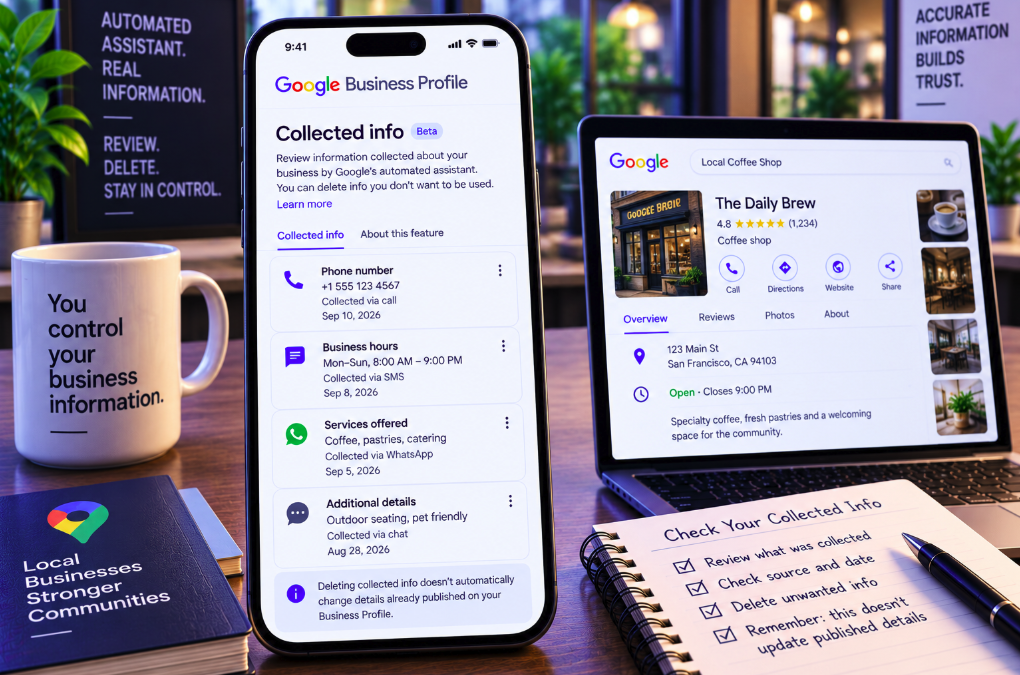
Google Business Profile owners can now inspect a category of information that previously sat largely behind the scenes: details Google collected directly from a business through automated outreach.
A new Collected info section documented in Google’s Business Profile Help lets eligible owners review information gathered when Google contacts the verified business phone number through automated calls, text messages or WhatsApp. The interface also shows where the information came from and when it was collected, and gives the owner a control to delete individual items.
The feature adds a meaningful transparency layer to Google’s increasingly automated local-information system. But it comes with an important limitation: deleting an item from Collected info removes that collected record from Google’s records; it does not automatically change a corresponding detail that is already published on the Business Profile.
Availability is also limited. Google says Collected info currently works only for selected regions, languages and business categories, so many profile owners may not see the new tab yet.
Google already contacts businesses to verify local information
Google Business Profiles are not built exclusively from information entered manually by the owner.
Google’s documentation on Business Profile data collection explains that local information can come from several sources, including publicly available web content, licensed third-party data, contributions from users and business owners, and information derived from Google’s interactions with a place or local business.
Automated outreach is one part of that system.
Google may contact a business to confirm whether information is current or to answer a customer’s request. That can include operational details such as opening hours or whether particular products and services are available.
The goal is to keep Search and Maps useful even when the owner has not manually updated every field.
Automated calls, SMS and WhatsApp can supply profile data
Google’s official automated calls and messages documentation says businesses may receive automated calls, SMS messages or WhatsApp messages to verify details such as opening hours or the availability of services.
These contacts can be initiated using the verified phone number associated with the Business Profile.
Information supplied in response may then be used to update the profile, subject to Google’s systems and review processes.
This means a staff member answering an automated call or responding to a message can become a source of structured business information inside Google, even if that person never opens the Business Profile management interface.
Until now, that collection process has not always been easy for owners to audit from one dedicated place.
Collected info creates a visible record of that automated collection
The new section gives eligible businesses a direct view into information Google has gathered through this outreach.
Google’s instructions are straightforward: open the Business Profile, choose Edit profile, then select Collected info.
For each item, the owner can review the information itself, the source and the date on which it was collected. Google says the information is displayed in the language in which it was originally provided.
That provenance is particularly useful for businesses with multiple employees, locations or customer-service channels. An owner who encounters an unexpected detail can determine whether it came from a specific collection interaction rather than assuming it was entered manually by an account manager.
The source and collection date make the feature more than another editor
Business Profile already provides controls for changing hours, addresses, phone numbers, services, attributes and other public details.
Collected info serves a different purpose.
It exposes part of the evidence Google has gathered about the business. Instead of merely showing the current public value, it gives the owner contextual information about how and when Google obtained a piece of data.
That distinction can matter when troubleshooting local-data conflicts. If a restaurant’s hours keep changing unexpectedly, for example, the problem may not be an account user editing the profile. Google may have collected contradictory information through another channel.
A provenance view can help the business identify that possibility more quickly.
Owners can delete individual collected items
Google also gives businesses a deletion control inside the new section.
If an owner decides that a collected item should not remain in Google’s records, it can be removed from Collected info.
This is useful when the information is outdated, incorrect, misunderstood or simply not something the business wants retained in that collection record.
However, Google’s help page makes a crucial distinction between deleting the collected record and editing the live Business Profile.
Those are not the same action.
Deleting Collected info does not automatically change the public profile
This is the most important operational warning for local SEO teams.
Google explicitly says that deleting collected information removes it from Google’s records but does not change other details already on the Business Profile.
Suppose an automated interaction records incorrect opening hours and those hours are subsequently reflected on the public listing. Deleting the underlying item in Collected info should not be assumed to restore the correct hours automatically.
The owner still needs to inspect the live profile and edit any incorrect public field separately.
A local SEO audit should therefore treat Collected info and published profile information as two connected but distinct layers.
The feature is not available to every business
Google labels the feature as limited availability.
According to the official help documentation, Collected info currently works only in selected regions, languages and business categories and may not be available for all users.
Google does not provide a complete public eligibility table on the main editing page.
That means two businesses—or even two locations belonging to the same organization—should not necessarily expect to see identical management options.
The rollout should therefore be described as a limited feature rather than a universal Business Profile change.
Automated outreach itself also varies by market and use case
The availability caveat is consistent with Google’s broader automated-calling system.
Google says automated calls for tasks such as booking appointments, checking restaurant wait times or confirming product and service details are available only in certain regions and languages and may not be available to every user.
Different automated functions also have different geographic coverage.
For local businesses operating internationally, that means Google’s information-gathering behavior can differ by market. A process observed at one location may not exist at another.
Multi-location brands should avoid assuming that a workflow tested in one country applies globally.
Collected info is not a complete log of everything Google knows
The name can create a broader impression than the feature warrants.
Google Business Profile data can originate from the business’s website, third-party licensed sources, user contributions, owner submissions and Google’s own interactions with the business.
The new section should therefore not be treated as a comprehensive ledger of every fact Google has ever gathered about a location.
It is better understood as a management surface for the information Google exposes through this particular collection workflow.
A business trying to understand why a public field is wrong may still need to inspect its website, structured data, third-party listings and user-generated information in addition to Collected info.
The new control helps explain how “Google updates” can happen
Business owners have long encountered situations in which Google suggests or applies information that differs from what they remember entering.
That is partly because Business Profile operates as a reconciled local-data system rather than a simple database controlled exclusively by the merchant.
Google tries to determine the most accurate representation of a business from multiple signals.
Automated verification can strengthen that process, but it also creates another path through which incorrect or misunderstood information can enter the system.
Showing the collected source and date gives owners more context for investigating those discrepancies.
A staff answer can become a local-search data point
The feature also has an organizational implication that extends beyond SEO teams.
Front-desk employees, store managers, restaurant staff and customer-service representatives may interact with Google’s automated systems. Their responses can supply information that Google may use to update the business listing.
That makes local-data governance partly a training issue.
Employees who answer business phones should understand that an automated Google call may be attempting to verify information that customers later see in Search or Maps.
A casual or ambiguous response about holiday hours, availability or services can have consequences beyond the conversation itself.
Google warns businesses about fraudulent calls
Automated outreach also creates an obvious impersonation risk.
Google’s documentation stresses that legitimate automated calls will not ask businesses for payment information, credit-card details or account passwords.
If a caller asks for money to keep a Business Profile active or visible on Google, the company says that call is not from Google.
This distinction is worth including in internal staff guidance because businesses already receive large volumes of misleading calls claiming to represent Google.
As automated verification becomes a normal part of profile maintenance, employees need to distinguish legitimate information requests from scams.
Businesses can control automated calls and messages in advanced settings
Google Business Profile also provides a setting for automated calls and messages.
In advanced profile settings, eligible businesses can turn Google’s automated calls and messages on or off for purposes such as accepting bookings, keeping business information updated or confirming product and service availability on behalf of customers.
That gives owners another level of control beyond reviewing collected information afterward.
The practical choice depends on the business. Automated verification can help keep information current, particularly for locations whose hours, inventory or services change frequently. But organizations with strict data-governance processes may prefer to centralize updates through controlled systems.
Local SEO teams should add Collected info to profile audits
For businesses that have access, the new section belongs in routine Google Business Profile monitoring.
An audit should compare collected information with the public profile, the official website and the organization’s source-of-truth location database.
Any discrepancy should be investigated at both levels. If the collected record is wrong, it can be deleted. If the public profile is also wrong, that field needs to be corrected separately.
Teams should also record the collection date and source before deletion when those details might help diagnose a recurring data problem.
This is especially important for chains, franchises and agencies managing hundreds or thousands of locations, where small inconsistencies can become difficult to trace.
Source consistency becomes more important as Google automates verification
The broader trend is clear: local-search systems increasingly verify business facts from multiple channels rather than waiting for owners to type every update manually.
That increases the value of consistency.
Hours on the website should match the Business Profile. Service information should agree with what employees tell customers. Structured data, menus, reservation systems and third-party listings should not contradict the organization’s current operating information.
The more automated systems Google uses to reconcile those sources, the more expensive conflicting data becomes.
Collected info gives businesses a new window into one part of that reconciliation process.
The rollout improves transparency without giving owners total control
The new feature is a meaningful improvement because it exposes information that Google’s automated assistant gathered directly from the business and gives owners a way to remove it.
But Business Profile remains a multi-source system.
Deleting one collected item does not erase an already published profile field, and it does not necessarily remove equivalent information Google obtained from another source. The owner still needs to manage the public profile and the broader local-data ecosystem.
Search Engine Land’s September 14 announcement highlights the rollout as a new visibility and control surface for business owners. Google’s own documentation confirms the essential behavior: eligible owners can review the collected data, see its source and collection date, and delete individual items.
For local SEO, the most useful takeaway is operational. Google is not only reading business information from the web; it can actively ask businesses for facts and feed those responses back into its local information systems. Owners can finally inspect more of that process—but they still need to check the live profile separately to make sure what customers see is actually correct.