
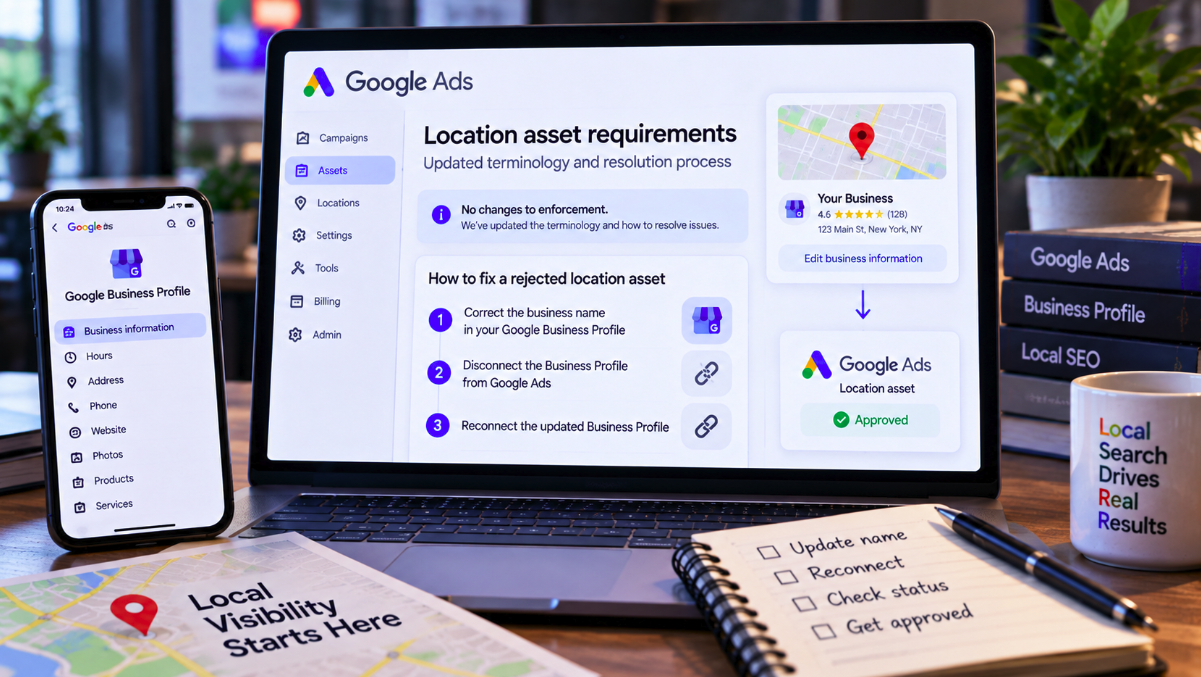
A rejected Google Ads location asset can look like an advertising problem, but Google’s latest troubleshooting guidance makes an important distinction: for some editorial rejections, the actual correction needs to happen outside Google Ads.
Google updated its Location asset requirements in June and again in September, with the latest policy notice posted on September 8. The company says the changes introduce updated terminology, improve readability and add troubleshooting instructions for advertisers using location assets.
There is no new enforcement standard.
That point is explicit in Google’s September 2026 policy update: the revision is intended to provide clearer information and “does not change enforcement” of the policy.
What has changed is the practical guidance. If a location asset is rejected for capitalization or for punctuation and symbols, Google now tells advertisers to correct the business name in Google Business Profile, then unlink and re-link that Business Profile in Google Ads so the corrected information can synchronize.
For local advertisers, that workflow is a useful reminder that a location asset is not simply a piece of ad copy. Its underlying business information can live in another Google product.
Location asset data can come directly from Google Business Profile
Location assets allow an advertisement to show information about a physical business location, including an address, phone number and potentially details such as opening hours and ratings.
They can appear across eligible Search, Display and video inventory and are also part of the infrastructure behind Google’s local advertising experiences.
For businesses that own their locations, one common source is Google Business Profile.
Google’s current Location asset requirements makes the ownership of that data explicit: business information and location images sourced from Business Profile are managed in the Business Profile account itself, not directly inside Google Ads.
Google’s broader location asset documentation similarly says that location information used in Ads can be sourced directly from Google Maps and Google Business Profile.
That architecture explains why an advertiser may not be able to solve every rejection by editing something in the Ads interface.
Capitalization errors now have a clearly documented three-step fix
The clearest example is an editorial rejection involving the business name.
Google says its standard requirements for clarity, spelling, spacing, capitalization and symbols apply to location assets just as they apply to other advertising content.
If a location asset is disapproved under the Capitalization policy, the documented workflow starts in Google Business Profile.
The advertiser should edit the business name so it uses normal title capitalization rather than unnecessary or exaggerated uppercase lettering. Once the source data is corrected, the advertiser should unlink the Business Profile from Google Ads and then link it again.
The purpose of the reconnect is synchronization: Google Ads needs to ingest the corrected location data from its source.
The same workflow applies to rejections involving punctuation and symbols. Google tells advertisers to remove unnecessary symbols from the business name in Business Profile and then perform the unlink-and-relink process.
The important correction may be upstream from the rejected asset
This is the practical lesson behind the policy update.
Suppose an advertiser sees a rejected location asset in Google Ads because the connected business name contains excessive capitalization or decorative punctuation.
The natural reaction is to look for an editable field beside the rejected asset.
But if that asset is being populated from Business Profile, Google Ads is downstream from the source of the problem.
Changing the underlying profile first is therefore not a workaround. It is the correct data-management layer.
This distinction is increasingly important as Google’s advertising products depend on shared data sources rather than campaign-specific fields. A local advertiser can have one business identity feeding Maps, Business Profile and advertising surfaces, with policy consequences following the data across those systems.
Unlinking and reconnecting happens through Google Ads Data Manager
Google documents the Business Profile connection inside the linked-products area of Google Ads.
Its Business Profile linking instructions direct advertisers to Data Manager under Tools, where the Google Business Profile connection can be managed.
From there, advertisers can inspect connected profiles, manage the relationship or unlink an account.
After the correction has been made in Business Profile, the profile can be linked again so Google Ads receives the updated location information.
This is more disruptive than correcting a typo in an ordinary ad field, which is why documenting the workflow matters. Teams managing Ads and Business Profile through different people or agencies may need to coordinate the change.
Synchronization is not necessarily immediate
Advertisers should also avoid assuming that a corrected Business Profile will instantly appear inside Google Ads.
Google’s troubleshooting documentation says changes to business information can take 24 to 48 hours to synchronize and appear after accounts are linked or information is updated.
Its location setup documentation similarly warns that newly linked locations can require roughly a day before they appear as synchronized.
That means an advertiser who fixes a name and immediately checks the Ads interface may still see the old state temporarily.
Google recommends checking that locations are verified and active, reviewing any labels used for location groups and, when locations still fail to appear after the expected synchronization period, trying the reconnect process as a final troubleshooting step.
Not every location asset rejection should be fixed this way
The new instructions are specific enough that they should not be generalized into “reconnect Business Profile whenever a location asset is rejected.”
The edit-and-reconnect workflow is explicitly documented for capitalization and punctuation/symbol issues.
Google’s location asset requirements cover several other reasons a location may be ineligible.
An advertiser cannot promote a physical location without the location owner’s explicit approval. Google can reject a location it does not recognize or one marked as closed. A location can also fail when it does not correspond to the business running the advertisement or when the promoted product or service is not available at that location.
Standard advertising restrictions continue to apply as well, including policies involving prohibited products, unsupported languages and other content restrictions.
Those problems require their own remedies. Re-linking an unchanged Business Profile will not turn an ineligible location into an eligible one.
The September update is procedural, not a policy crackdown
Google’s wording is particularly important for advertisers monitoring policy changes.
A policy page changing does not automatically mean Google has introduced a new reason to reject ads.
In this case, Google specifically says the June and September revisions were made to update terminology, improve readability and provide troubleshooting steps.
Enforcement has not changed.
Search Engine Roundtable highlighted the update on September 9, noting the new resolution guidance while emphasizing the absence of an enforcement change. The distinction prevents a documentation improvement from being misreported as a new advertising restriction.
Location assets connect advertising with a business's public identity
The update also illustrates why Business Profile governance matters beyond local SEO.
A company name inside Business Profile is not merely a Maps listing field. When the profile is connected to Google Ads, that information can feed advertising assets as well.
The same applies to core location information such as addresses, opening status and other business details.
Google says successful updates to location information in Maps flow into linked Ads accounts. It also says that when a business or individual location is marked temporarily or permanently closed in Business Profile, the corresponding Google Ads location assets will stop showing to customers.
For organizations with dozens or hundreds of branches, ownership of Business Profile data is therefore an advertising operations issue as much as a local-search issue.
Location assets can affect more than the address shown under an ad
The stakes are broader than cosmetic presentation.
Google says location assets can display an address, map or approximate distance to a store. They can also support local advertising objectives and, for eligible accounts, contribute to capabilities such as store-visit conversion measurement.
Google’s current Local Ads documentation says advertisers need location assets linked at the account or campaign level to be eligible for Local Ads.
A persistent location-asset problem can therefore interfere with the infrastructure connecting digital advertising to physical stores.
That does not mean every rejected asset causes lost store visits or measurable revenue damage. No such performance conclusion follows from the policy update.
It does mean location data should be treated as production advertising data rather than an optional listing detail.
Agencies need access to the right account, not just Google Ads
The new troubleshooting workflow has an operational consequence for agencies.
An agency may have full access to the client’s Google Ads account but no permission to edit its Google Business Profile.
In that setup, a capitalization rejection cannot necessarily be resolved by the paid-media team alone.
Someone with appropriate Business Profile permissions must correct the source information. The Ads connection then has to be refreshed according to Google’s instructions.
This is a useful item for onboarding checklists: if an agency is responsible for location assets, it should know who controls the corresponding Business Profiles before a rejection occurs.
Advertisers can still appeal a decision
Correcting the underlying information is not the only path when an advertiser believes Google made the wrong policy decision.
Google says advertisers can appeal policy decisions from their Google Ads account where that option is available. Its policy documentation also provides a disapproved-ads and policy-question form.
An appeal is appropriate when the advertiser believes the asset already complies. Editing a legitimate business name solely to satisfy a misunderstood rejection would not necessarily be the right response.
When there is a genuine formatting violation, however, fixing the source data before appealing gives Google an updated asset to evaluate.
A small documentation change exposes a larger Google Ads reality
Google’s September location asset update is not a new enforcement regime.
It is arguably more useful than that: it makes the troubleshooting chain clearer.
For capitalization and punctuation/symbol rejections, the chain can begin with Google Business Profile, continue through the connection in Google Ads and end with the refreshed location asset.
That workflow reflects the increasingly interconnected nature of local advertising. The address and business identity shown in an ad may not belong to the ad campaign as isolated fields; they can be synchronized from a profile used across Google’s local ecosystem.
So when a location asset is rejected, the first question should not always be “What do I change in Google Ads?”
Sometimes the more useful question is: “Where did Google Ads get this business information in the first place?”