
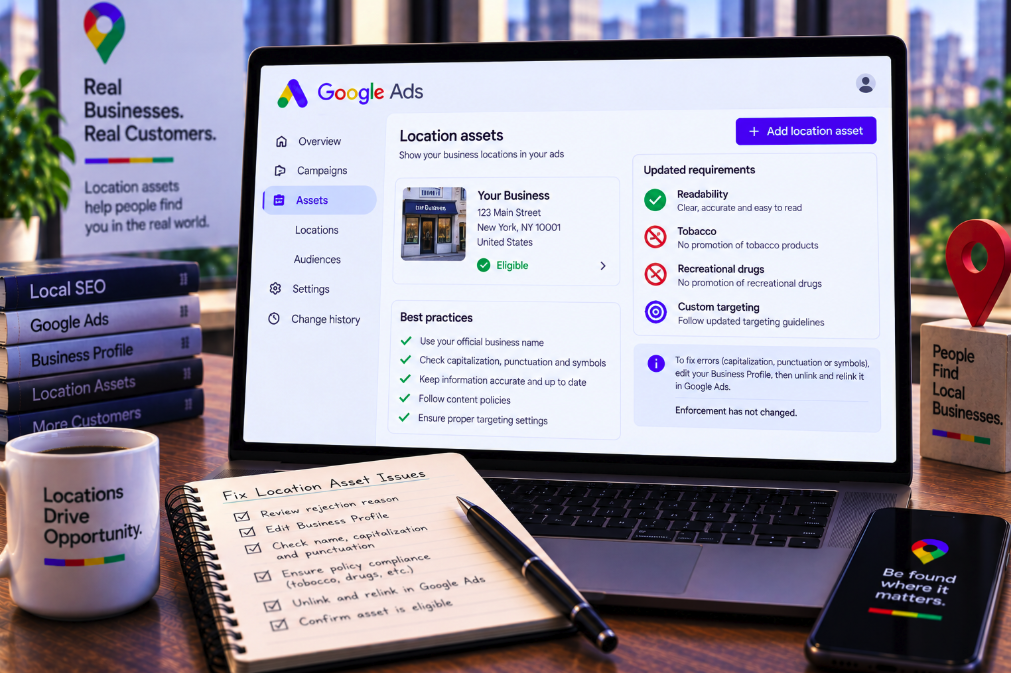
A rejected Google Ads location asset can look like an Ads problem even when the field that needs fixing lives somewhere else. Google's newly clarified policy documentation makes that dependency explicit: if a location asset is disapproved for capitalization, punctuation or symbols, advertisers may need to correct the business name in Google Business Profile and then disconnect and reconnect the profile in Google Ads so the updated data synchronizes.
The clarification appeared in Google's September update to its location asset requirements and was highlighted by Search Engine Roundtable on September 9. The revised documentation also makes requirements around readability, tobacco, recreational drugs and restricted targeting in personalized advertising more explicit.
The most important qualification is that Google says enforcement has not changed. In its official September 2026 update notice, Google says the June and September revisions were intended to update terminology, improve readability and add troubleshooting steps for advertisers using location assets. The company explicitly states that the update does not change enforcement of the policy.
So this is not a newly announced crackdown on local advertisers. It is a clearer explanation of how existing Google Ads rules apply to location assets—and, crucially, where advertisers must make certain corrections when those assets are populated from Google Business Profile.
Location assets inherit data from outside Google Ads
Location assets can add an address, phone number, opening hours, ratings and other business information to an ad. That makes them valuable for advertisers whose conversion happens partly or entirely in the physical world.
But the location information is not always managed directly inside the Ads interface. Google's current location asset requirements explain that Google Business Profile is commonly used to create and provide location data for Google Ads. Business information and location images are managed in the Business Profile itself rather than in Ads.
That architecture creates a troubleshooting trap. An advertiser can see a disapproved asset in Google Ads, open the Ads interface and naturally look for a field to edit there. For some editorial problems, that is not where the authoritative value lives.
The policy clarification makes the data flow easier to understand: if the rejected text originates in Business Profile, the correction needs to begin at the source.
Capitalization problems may need to be fixed in Business Profile
Google's standard editorial requirements apply to location assets. The company requires clarity and conventional use of spelling, spacing, capitalization and symbols across ads and assets.
Its editorial policy prohibits capitalization that is not used correctly or for its intended purpose. A business name written in exaggerated all caps or with unnecessary capitalization can therefore create an approval problem even if that styling was originally entered into a Business Profile rather than created as ad copy.
The updated location-asset page now tells advertisers what to do. For a disapproval under Capitalization, the business name should be corrected in Google Business Profile to use standard title case.
This is a small documentation change with practical value. It identifies the source record that controls the asset instead of leaving advertisers to repeatedly edit or appeal the symptom inside Ads.
Punctuation and symbol disapprovals follow the same workflow
Google applies similar editorial standards to punctuation and symbols. Its policy prohibits punctuation or symbols used incorrectly or excessively, unsupported characters and decorative formatting that does not serve a legitimate purpose.
There are exceptions. A trademark, brand or product name can sometimes legitimately use non-standard punctuation when that usage is consistent, and certain commonly accepted symbols can be allowed. But arbitrary decoration in a business name can still trigger a rejection.
For location assets disapproved under the Punctuation and symbols policy, Google's new troubleshooting instruction again points to Google Business Profile. The advertiser should remove unnecessary symbols from the business name there.
The distinction matters operationally because location assets are representations of a real business entity. Google is not asking advertisers to create an alternative Ads-only spelling merely to satisfy the ad system. It wants the underlying business information corrected and then synchronized.
The unusual step is unlinking and relinking the Business Profile
Editing the Business Profile is only the first part of Google's stated fix. After correcting the business name, Google instructs advertisers to unlink and then re-link the Google Business Profile in Google Ads to sync the changes.
That is the detail most likely to save advertisers time. A team could otherwise make the correct edit in Business Profile and wait for a rejected Ads asset to update automatically, only to find that the disapproval remains attached to stale or unsynchronized information.
The relinking step effectively forces the Ads account to re-establish the location source after the authoritative profile has been corrected. Advertisers should then monitor the asset's policy status and use Google's review or appeal process where appropriate.
This is not a general instruction to disconnect Business Profile whenever any local ad is rejected. Google's explicit relinking guidance applies to location-asset disapprovals for capitalization or punctuation and symbols described in the updated policy.
The update also clarifies tobacco restrictions
The revised page now contains an explicit Tobacco section. Google states that ads for tobacco, products containing tobacco, components of tobacco products and products that facilitate or promote tobacco consumption are not allowed.
That rule is not unique to location assets; it comes from Google's broader advertising policies. Adding it to the location-asset requirements makes the relationship clearer for local advertisers whose physical location might otherwise be eligible to appear in an ad.
A valid real-world business location does not make an otherwise prohibited product eligible for advertising. Location assets remain subject to standard Google Ads policies in addition to requirements specific to the location format.
For agencies managing local campaigns, this is a reminder that asset eligibility should be evaluated together with the advertised category, not only the accuracy of the address and business listing.
Recreational drugs are now called out explicitly too
Google has also added a dedicated Recreational drugs section to the location-asset requirements. The policy prohibits advertising substances used to alter mental state for recreation or induce a high, along with products or services marketed as facilitating recreational drug use.
Again, Google says the documentation update does not represent a change in enforcement. The significance is discoverability: an advertiser reading the location-asset page can now see the relevant restriction directly rather than having to infer it from the wider Ads policy library.
This is particularly useful because local advertising frequently intersects with regulated or restricted categories. A business can exist legitimately in a jurisdiction while still being ineligible to advertise a particular product through Google's platform.
Local presence and advertising eligibility are separate questions.
Personalized advertising restrictions can apply to location campaigns
The revised requirements also explicitly point advertisers to Google's restricted-targeting rules for personalized advertising. Google limits how targeting can be used in certain sensitive categories to avoid creating harmful or inappropriate personalized ad experiences.
This means compliance is not only about the creative asset or the business location. How the advertiser chooses an audience can also determine whether a campaign is permitted.
That distinction is increasingly important as local campaigns use customer lists, audience segments, remarketing and automated targeting. A perfectly formatted location asset does not override restrictions on using sensitive information or sensitive interest categories for personalization.
The correct audit therefore spans three layers: the underlying business information, the content or service being promoted and the targeting method used to reach the audience.
Readability is an asset requirement, not a cosmetic preference
Google's editorial rules are framed around a professional, understandable advertising experience. Location assets are subject to the same standards for clarity, spelling, spacing and appropriate capitalization and symbols as other ad assets.
For a local advertiser, those rules can feel unusually strict because a business may intentionally style its public name with decorative punctuation or unconventional capitalization. But Google Ads evaluates the information as advertising content once it is incorporated into an ad.
This creates a potential tension between branding and policy compliance. A business name that is recognizable offline may still need to fit Google's editorial standards unless its unusual formatting qualifies for an exception.
Advertisers should therefore review Business Profile naming before connecting it to paid campaigns rather than discovering the mismatch only after assets are rejected.
Google has also cleaned up outdated “extension” terminology
Search Engine Roundtable notes another less dramatic but useful change: Google removed lingering references to the old term “extension” and aligned the documentation with its current “asset” terminology.
Google renamed ad extensions as assets years ago, but older help documentation and troubleshooting language have persisted in places. The new location policy more consistently describes disapproved ads and assets and directs advertisers toward current policy-decision workflows.
This part of the revision has no ranking or enforcement implication. It is documentation maintenance. But consistent terminology reduces confusion for advertisers trying to match a policy article with the labels they actually see inside the current Google Ads interface.
It also reinforces Google's stated purpose for the September update: clarity rather than a policy expansion.
Some older policy references were removed from the page
The comparison highlighted by Search Engine Roundtable shows that the revised document adds explicit sections for tobacco, recreational drugs and restricted personalized-ad targeting while removing several previously listed related-policy sections, including misleading content, unavailable offers, unclear relevance and trademarks.
That should not be read as Google suddenly permitting misleading ads, unavailable offers or trademark violations in location assets. Location assets remain subject to standard Google Ads policies.
The page has been reorganized to emphasize requirements Google considers particularly relevant to this format while the general policy framework continues to apply. The absence of a policy from this particular help page is not an exemption from the broader Ads rules.
This is another reason the “enforcement has not changed” statement matters. A documentation diff can look like a policy change even when Google is primarily reorganizing guidance.
A rejected location asset should be traced back to its source
The practical lesson for PPC teams is to troubleshoot the data lineage before making random changes. First identify the exact disapproval reason in Google Ads. Then determine where the rejected information originates.
If the issue is capitalization or punctuation in the business name and the location comes from Google Business Profile, edit the authoritative Business Profile. Use conventional title case, remove unnecessary symbols and ensure the public business information remains accurate.
Then follow Google's specific synchronization instruction: unlink and re-link the Business Profile in Google Ads. After synchronization, monitor the asset's status and appeal if the corrected asset remains disapproved and you believe it complies.
This approach is more reliable than repeatedly recreating the asset without fixing the underlying record.
Agencies should be careful with Business Profile permissions
The new troubleshooting process also exposes an organizational issue. The person managing Google Ads may not have permission to edit the linked Business Profile, particularly in agency environments or companies with separate local-SEO and paid-media teams.
A PPC specialist can diagnose a capitalization rejection but may need a Business Profile owner or manager to make the actual correction. The account may then require someone with the appropriate Google Ads access to unlink and reconnect the location source.
That makes ownership documentation important. Teams should know which Google account controls the Business Profile, who is authorized to edit the business name and who can manage the connection to Ads.
Without that operational map, a trivial punctuation rejection can turn into a multi-day access problem.
Do not change a legitimate business identity casually
Google's instruction to edit the Business Profile does not mean advertisers should rename a business purely to manipulate ad approval. Business Profile information is supposed to represent the real-world business accurately.
If unusual capitalization or punctuation is genuinely part of a recognized brand or trademark, advertisers should review the relevant editorial exceptions and appeal mechanisms rather than replacing the public identity with inaccurate information.
The goal is consistency between the real business, its Business Profile and the advertising asset. An Ads workaround that makes the profile less truthful can create a different compliance problem.
Local marketers should therefore treat Business Profile as shared infrastructure across organic Maps visibility, local information and paid location assets—not as an editable field owned solely by the advertising team.
Location asset QA should happen before campaign launch
The clarified rules suggest a simple preventive workflow. Before linking locations to a major campaign, audit the Business Profile names for capitalization, decorative punctuation and unsupported symbols. Confirm that locations are active and accurately represent the advertiser. Check whether the promoted category creates policy restrictions and whether personalized targeting is allowed for the campaign's subject matter.
That pre-launch review is especially useful for large brands with dozens or hundreds of locations. One naming convention replicated across an entire Business Profile estate can create a large number of asset disapprovals at once.
Centralized naming standards can prevent the problem. So can a clear handoff between local-SEO teams that maintain Business Profiles and paid-media teams that consume those profiles as location sources.
The more automated Google Ads becomes, the more important clean upstream data becomes.
The larger lesson is that Google Ads increasingly depends on connected data
Location assets illustrate a broader shift in advertising systems. Campaign managers no longer control every element directly inside the campaign. Ads can draw business identity, products, locations, images and other signals from connected Google properties and data feeds.
That makes troubleshooting a systems problem. The visible rejection can occur in Google Ads while the correction belongs in Business Profile. A shopping problem can originate in Merchant Center. A conversion issue can begin in analytics or tagging infrastructure.
The September location-asset documentation is useful precisely because Google now explains one of those cross-product dependencies explicitly.
For advertisers, the takeaway is straightforward: if a location asset is rejected for capitalization, punctuation or symbols, do not assume the fix lives in Google Ads. Correct the business name at its source in Google Business Profile, then unlink and re-link the profile so Ads receives the updated data. And because Google says enforcement itself has not changed, treat this as a better troubleshooting map—not a newly announced policy crackdown.