
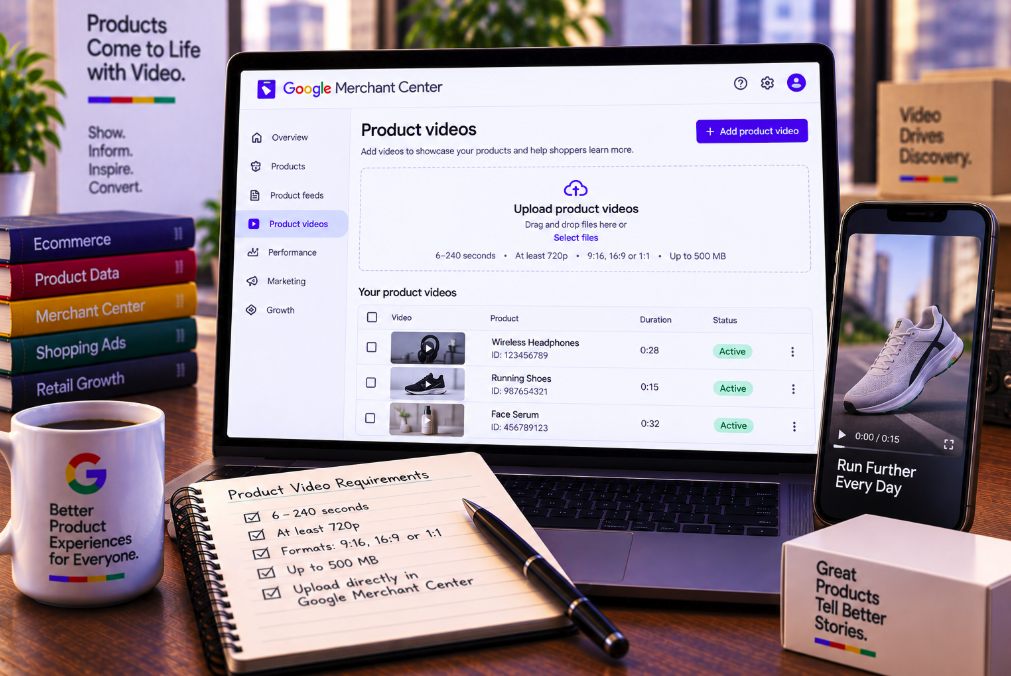
Google Merchant Center is giving retailers a more direct way to bring video into their product marketing. A newly spotted “Product videos” section allows merchants to upload product footage inside Merchant Center rather than relying only on videos discovered from external sources or created through Google's own tools.
The interface was spotted by Arpan Banerjee and reported by Search Engine Roundtable on September 11. Google's upload screen says product videos can provide a more immersive shopping experience by showing products from different angles, demonstrating fit, revealing texture and communicating details that static images cannot fully capture.
The technical requirements are unusually clear in the interface: videos must run for at least six seconds and no more than 240 seconds, have a minimum resolution of 720p, use a 9:16, 16:9 or 1:1 aspect ratio and stay below 500 MB. Google also warns that videos should not be low resolution, blurry or out of focus.
The update matters because it adds another path into Google's growing product-video ecosystem. Merchant Center already aggregates video assets from websites, social channels and Product Studio, and Google introduced a product-data attribute for video links earlier in 2026. Direct uploads make video management more accessible to retailers that already have finished product clips sitting in their creative libraries.
The new Product videos screen accepts uploaded files
The feature shown in the Merchant Center screenshot is framed specifically around adding product videos. That makes it different from a system that merely discovers a video already hosted elsewhere.
Google's interface describes the purpose in merchandising terms rather than advertising jargon. Product video is presented as a way for shoppers to inspect a product more completely, including details that are difficult to communicate with still photography.
That positioning is important. Merchant Center is increasingly becoming a repository for the assets and structured information Google can use to construct richer product experiences across its surfaces.
Video now sits alongside images, titles, prices, shipping data, loyalty benefits and other product information as another input into that ecosystem.
Videos must be between 6 and 240 seconds
The minimum length of six seconds prevents extremely short fragments from qualifying as product videos, while the four-minute maximum leaves considerable room for demonstrations and richer explanations.
Most ecommerce teams will probably not need the full 240 seconds for every product. A short apparel clip can show fit and movement in seconds, while a technical product may benefit from a longer demonstration of features or setup.
The range gives merchants flexibility without turning the upload section into a repository for unlimited long-form content.
Retailers should choose duration according to the information a shopper needs rather than trying to fill the maximum allowance. The strongest product video is usually long enough to answer a visual question and short enough to retain attention.
Google requires at least 720p resolution
Merchant Center sets 720p as the minimum video resolution. Google also explicitly warns against low-resolution, blurry or out-of-focus footage.
That quality requirement reflects the role the video may play in a shopping experience. Product media is not simply decorative; shoppers may use it to evaluate materials, construction, size, color and other details before making a purchase decision.
A poorly focused video can therefore undermine the value of the asset even if the product itself is strong.
Merchants should treat 720p as a floor rather than necessarily the production target. Higher-quality source footage gives platforms more flexibility when rendering video across different screen sizes, although file size still needs to remain within Google's limit.
Three aspect ratios cover vertical, horizontal and square video
Google accepts 9:16, 16:9 and 1:1 video. Together, those formats cover the three dominant creative orientations used across modern digital commerce.
Vertical 9:16 video is natural for smartphone-first viewing and short-form social creative. Horizontal 16:9 remains useful for conventional video, product demonstrations and wider compositions. Square 1:1 provides a flexible middle ground that can work effectively in feeds and compact product placements.
The supported ratios also make it easier for retailers to reuse existing creative produced for social media, websites and advertising campaigns.
That does not mean the same edit will perform equally well everywhere. Merchants should check framing, text size and product visibility in each format rather than simply cropping one master video automatically.
The maximum file size is 500 MB
Google caps individual video uploads at 500 MB. That is generous enough for high-quality product footage while still encouraging reasonable compression and delivery.
File size can grow quickly when retailers upload long clips at high resolutions and bitrates. Teams preparing Merchant Center assets should therefore maintain export presets that balance visual clarity with efficient file size.
Compression should not be pushed so aggressively that textures, product edges or motion become visibly degraded. The point of product video is to reveal information that static imagery cannot show, and excessive compression can erase exactly those details.
The 500 MB limit is a technical ceiling, not a creative target.
Direct uploads are different from Merchant Center's existing Video assets page
Google already maintains a broader Video assets page in Merchant Center. That page is designed to aggregate and manage video content across Google's advertising and organic surfaces.
Google says the existing Video assets experience can pull videos from a merchant's website, connected or discovered social channels and Product Studio. The system can show a centralized selection of videos without necessarily storing copies of externally sourced footage.
The newly spotted Product videos upload flow is therefore notable because it appears to give merchants a direct file-ingestion route. Instead of waiting for Google to discover an asset from a website or social profile, the retailer can intentionally provide the video.
That distinction gives brands more control over which finished creative enters the Merchant Center workflow.
Google already maps products to video assets
Merchant Center's existing video tools do more than collect files. Google uses AI to identify products shown in videos and can suggest mappings between video content and product offers.
For YouTube videos, merchants can review Google's suggested product, accept it, modify the association or reject it. Google says one product offer can be selected to feature in a single video through that workflow.
Videos discovered on a merchant's website can also be automatically mapped to product offers, while Product Studio videos are generated from Merchant Center products themselves.
The new upload capability fits naturally into that architecture: the more accurately video can be connected to a specific product, the more useful it becomes as a shopping asset rather than generic brand content.
Product videos can enrich organic product listings
Google's Video assets documentation says product videos can appear in product listings across Google in organic search results. That means video inside Merchant Center is not limited to paid Shopping campaigns.
This is strategically important for retailers. A product-video workflow can support both advertising and unpaid product discovery rather than requiring entirely separate asset pipelines.
Google can also use eligible videos on a merchant's brand profile on Search, giving video a role beyond individual product listings.
The exact surface on which a particular uploaded video will appear can depend on eligibility and Google's systems, so uploading an asset should not be interpreted as a guarantee of placement.
Merchant Center can also share videos with Google Ads
Google says videos available through Merchant Center's Video assets experience can be shared with the Google Ads asset library when the two accounts are linked.
Advertisers can then access video assets through the media picker while constructing campaigns. This reduces the need to repeatedly upload the same creative into separate Google systems.
For large ecommerce organizations, that centralization can be operationally valuable. Creative teams can maintain approved product footage while performance teams access the assets when building campaigns.
The result is a more connected content pipeline between product data and advertising execution.
Google introduced the video_link attribute earlier in 2026
Direct upload is not Google's first major product-video update this year. In April, Google announced an optional video_link attribute in the 2026 Merchant Center product data specification.
The attribute lets merchants submit links to product videos through their product data. Google said the purpose is to showcase products in more detail, including showing them in use or from different angles.
Merchants were allowed to begin submitting the attribute from April 14, while policy and quality validation and eligibility to serve began on June 30.
The new direct-upload screen should therefore be understood as another ingestion method within a broader video strategy, not the first time Merchant Center has supported product video.
Policy problems with a video do not necessarily disapprove the product
Google's documentation for the video_link attribute provides a useful clue about how it treats video quality and policy issues. Starting June 30, Google began reporting policy and quality warnings or errors for submitted video links.
Google says an error can prevent the video itself from serving while leaving the associated product offer eligible to appear.
That separation is sensible because the product listing and the supplemental video are different assets. A retailer should not necessarily lose the entire offer because one video fails a quality check.
Merchants should still monitor Merchant Center's Needs attention area because video problems can reduce the richness of the product experience even when the product remains active.
Product Studio provides a third route: generate the video with AI
Retailers that do not already have product footage can use Google's Product Studio rather than uploading a finished clip. Google's Product Studio tools can generate product videos from existing product imagery.
Google introduced AI-powered video generation in Product Studio as a way to turn still images into dynamic marketing assets. Merchants can select a product and a video theme, while Google's system assembles the material into a video.
This creates three conceptually different workflows: bring a finished video into Merchant Center, submit or surface externally hosted video, or generate new creative with Google's AI tools.
Different retailers will prefer different routes depending on their production resources and brand-control requirements.
Direct upload is especially useful for brands with existing creative libraries
Many established retailers already have hundreds or thousands of product clips created for ecommerce product pages, social campaigns, marketplaces and paid media.
For those organizations, AI generation is not necessarily the primary need. The challenge is distribution: getting approved creative into the systems where it can improve product discovery.
A direct Product videos upload section can shorten that path. Teams can select existing high-quality footage rather than recreating the asset or depending on Google to discover it elsewhere.
This can also improve brand consistency because the uploaded video has already passed the retailer's own production and legal review.
Vertical video deserves a dedicated ecommerce workflow
The explicit support for 9:16 reflects how central vertical video has become to product discovery. Many retailers now produce mobile-first demonstrations, try-ons and creator-style product clips as a standard part of merchandising.
Those assets can communicate movement and scale particularly well for categories such as fashion, beauty, fitness and home products.
However, ecommerce teams should avoid treating vertical footage as simply a social-media asset with a product link attached. A strong product video should keep the item visible, show relevant details quickly and avoid burying useful information behind a long introduction.
The supported format opens the door; merchandising quality determines whether the video actually helps the shopper.
Video can answer questions static product images cannot
Google's own interface emphasizes angle, fit, texture and detail, and those examples explain why video can add value to a product listing.
A still image can show the shape of a jacket, but video can show how the fabric moves when worn. A photograph can show a kitchen appliance, while video can demonstrate its controls and operating sequence. A furniture image can show color, while a slow camera movement can reveal surface texture and proportions more clearly.
The best use of product video is therefore informational rather than ornamental.
Retailers should identify the uncertainty that prevents a shopper from buying and design the video to reduce that uncertainty.
Product videos should complement, not replace, strong images
The arrival of direct video uploads does not reduce the importance of product photography. Images remain faster to scan, easier to compare and essential across many Shopping placements.
Video is most effective as an additional layer. A shopper can understand the product quickly from images and then use video when they need evidence about motion, scale, function or real-world appearance.
That means the creative strategy should avoid making the video a duplicate slideshow of the same images already present in the listing.
If the moving asset does not reveal anything new, it is consuming production effort without adding much shopping information.
Retailers should build a repeatable video QA process
The technical requirements provide a useful starting checklist: verify duration, resolution, focus, aspect ratio and file size before upload.
Creative QA should go further. Confirm that the correct product is clearly visible, colors are representative, claims are supportable, packaging is current and the clip does not accidentally show an outdated model or variant.
For apparel, check that fit and styling do not create misleading expectations. For products with moving parts, show operation accurately. For regulated or sensitive categories, make sure the content follows the relevant Google and market policies.
A reusable QA workflow becomes increasingly important as video libraries scale across thousands of SKUs.
Merchant Center is becoming a creative-content hub
Historically, Merchant Center was associated primarily with structured product feeds: identifiers, titles, prices, availability and shipping information. Google's recent changes are broadening that role.
The platform now includes Product Studio, centralized Video assets, social and website video discovery, AI-assisted product mapping and product-level video links. Direct product-video uploads extend the same direction.
This turns Merchant Center into a bridge between commerce data and creative media. Google does not only need to know what the product costs; it increasingly wants enough rich content to show what the product looks like and how it behaves.
For retailers, feed management and creative operations are becoming harder to separate.
The practical opportunity is richer product discovery
The new Product videos section is not simply another upload button. It gives retailers a direct route for supplying one of the most information-dense assets available in ecommerce.
The requirements are straightforward: six to 240 seconds, at least 720p, 9:16, 16:9 or 1:1, no more than 500 MB and sufficient visual quality to avoid blurry or out-of-focus footage.
Google already has systems for associating videos with products, distributing video across organic surfaces, sharing assets with linked Google Ads accounts and generating additional videos through Product Studio. Direct uploads make that ecosystem easier to enter for merchants that already own the creative.
The strategic implication is clear: product feeds are becoming multimedia. Retailers that treat video as structured merchandising content—not merely as a social campaign format—will be better positioned as Google gives moving product imagery a larger role across Search, Shopping and advertising.